

Revolutionize your accounting – for real! The new service provider Hent mine fakturaer turns a long-desired and often-promised dream in accounting into reality. It reduces the work required for incoming invoices, at least for cost calculations, to nearly zero.
Hent mine fakturaer combines the typical entry points and thus makes it possible to combine receiving invoices into one central location. Hent mine fakturaer takes on the following tasks for you:
- It retrieves incoming invoices from your e-mail inboxes.
- You can send purchase invoices you received by e-mail directly to a yourcompanyname@GetMyInvoices inbox. Navision then will then retrieve these invoices directly from within Hent mine fakturaer and you do not have to even move a muscle to do so.
- Hent mine fakturaer also indexes invoices you receive by mail. To do so, simply scan the invoices. The scanned invoices are then passed on to the Hent mine fakturaer services. When your scanner supports Scan2Mail (scan to mail), for example, this process can be carried out without any further user interaction. Hent mine fakturaer then takes care of the indexing and keywording for you.
- You can retrieve incoming invoices from thousands of portals like Amazon, Vodafone, Google Adwords, Telekom, etc. The amount of work you save for AdWords alone is monumental. You can even use GetMyInvoices for public utility companies, water companies, and power supplier, etc.
If desired, Hent mine fakturaer will prepare the incoming invoices for you in a file format so that you can import all invoices arriving in Hent mine fakturaer into Navision fully automatically – and it will also add vendors automatically, if you so desire.
Costing accounting – pretty much anything and everything you can record in a journal – can thus be recorded and booked with nearly full automation. Invoices from C suppliers (only very few or individual orders in the system) can also be entered automatically in this manner. Navision checks with the identified supplier whether there is an order with „about“ this amount. When Navision finds the order, the invoice (with tolerances you can set) is entered automatically with the vendor invoice number and the receipt is attached automatically.
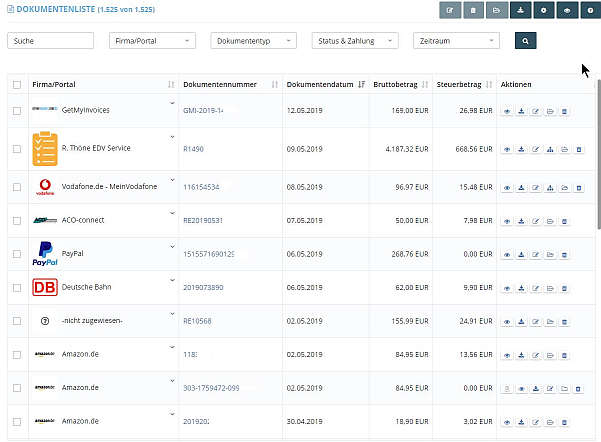
Navision reduces your post-processing to a – usually one-time – assignment of the cost type (G/L account number) for each newly entered supplier and tax rate. When a supplier has multiple cost types (G/L accounts), it suffices to assign them when they occur. For the next incoming invoice, Navision will suggest the saved cost types of this customer to you so that you can assign the correct cost type within seconds.
GetMyInvoices has already entered the customer, invoice number, due date, and the gross and net amounts.
Hent mine fakturaer not only OCR with an AI trained with hundreds of thousands of documents, but also ZUGFeRD – without you having to take care of anything.
It does not matter whether your employees placed the order by phone, Navision or fax. Or whether they made the purchase in person. You can also manage the payment type for each customer directly in Navision or Hent mine fakturaer to, for example, automatically pre-allocate cash payments (e.g.at the hardware store or office supply store or grocery store).
- Free trial
- Begynd Hent mine fakturaer by clicking on the symbol on the left.
- During the setup, create a Hent mine fakturaer mailbox with your company name/client name.
- Send 50 random incoming invoices to this new e-mail address from your incoming invoice mailbox.
- Take a look in Hent mine fakturaer how your invoices were indexed automatically: the invoice number, individual net amounts, individual tax rates, due dates were recognized fully automatically.
- Assign the invoices to individual suppliers, ideally with their customer number at the beginning
- Send an additional 50 invoices to this mailbox. Invoices already recognized once are now already allocated fully automatically.