


If you purchase or sell goods across continental borders (e.g., sales/purchases from/to the Far East, such as Japan, China, India), you will certainly be working with container shipping. Here and there, this may also involve fresh produce being transported by air, but the bulk of it is “non-perishable goods” shipped across the oceans in steel containers. Of course, my container management system can also handle the significantly shorter shipping times offered by Belt & Road land transport! Nowadays, this is increasingly the preferred shipping method for small, high-value products such as turned parts, electronic components, and other components that are usually very compact.
I support your scheduling and goods receipt with my container management system.
I am currently working on additional articles on the topics of warehouse management/WMS and long-term scheduling for purchasing in/from the Far East.
View of the container list in the web client/BC365:
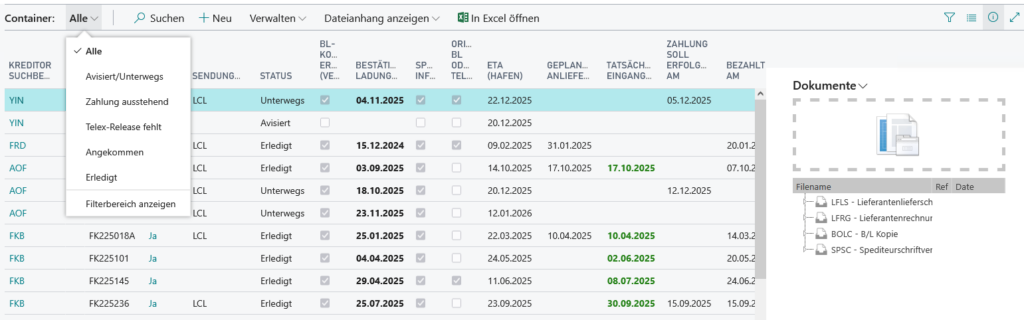
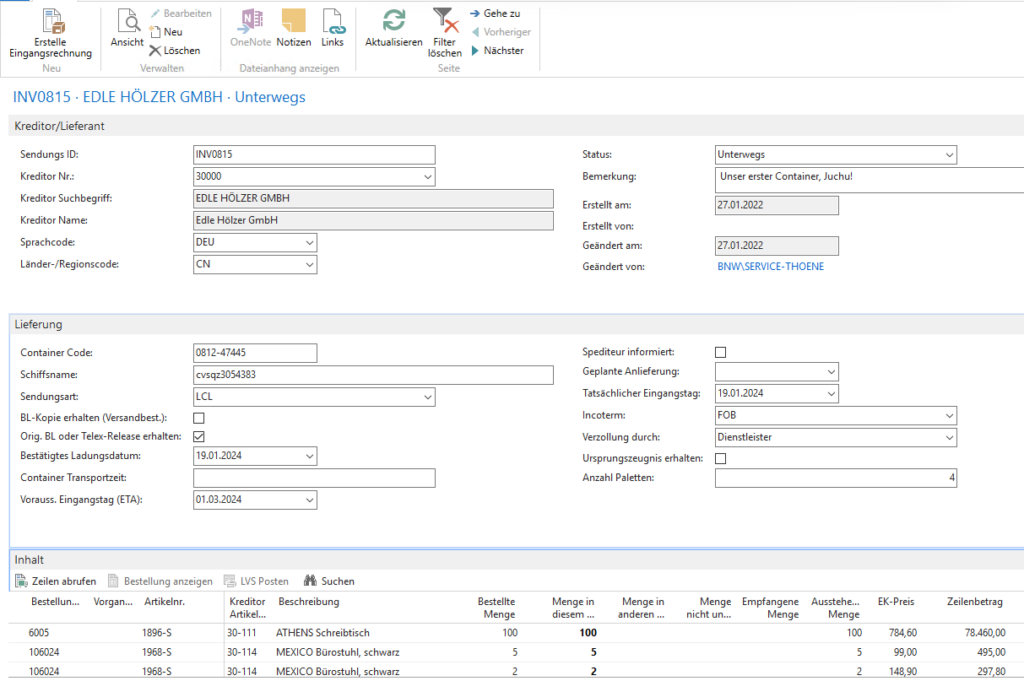

A few explanations about this container mask / screenshot:
Create incoming invoice: The container “knows” everything about the advance invoice/incoming invoice (which has usually already been paid). This means that with a single mouse click, you can create the corresponding incoming invoice with the appropriate exchange rate, all items and their delivered quantities, etc. This function alone can easily save you several hours of data entry work per container.
Creditor numbers, language codes, and country codes are terms you are surely familiar with if you shop abroad.
You can track the container via its status , and your sales staff will also know when they can expect the goods to arrive—and even more, of course, via the loading date and expected goods receipt date. Notified, Waiting for BL (bill of loading), In transit, Arrived, Completed.
Containercode: If you fill this out correctly, you can check online at https://www.track-trace.com/container, for example, to see where in the world your container was last reported... depending on the ship operator, you can even see the current location of the ship. You can also do this using the ship name at https://www.vesselfinder.com/de, for example.
Through the Incoterms you can inform your goods receiving department about upcoming customs clearance, for example. The confirmed loading date loading date can be used to determine the expected arrival date (planned delivery) at the destination port with a rough estimate of the transit time (based on country codes).
In the lines, you can conveniently enter the items expected in this container and their quantities using the"retrieve lines"function. The system automatically supports you in this process by only suggesting order lines that have not yet been completely distributed to containers. This allows you, for example, to easily split purchase orders across multiple containers or assign complete purchase orders to a single container.
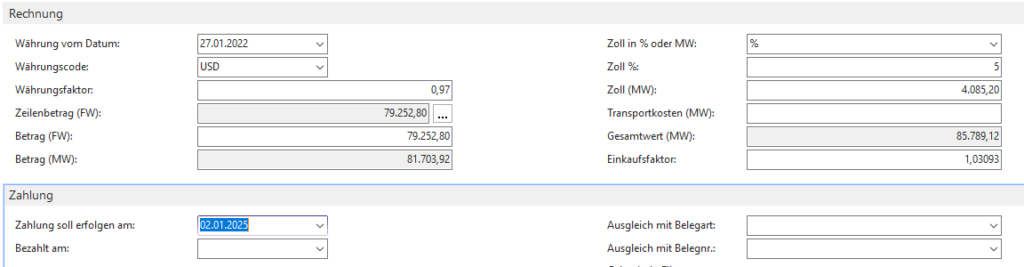
In the invoice section of the container, you can conveniently enter automatic or manual currency factors, which is very important for currency futures contracts, for example. Navision/Business Central also independently determines markup factors (“purchase factor”) from this, which can then be used to correctly convert the cost price of the goods received into the relevant currency. Customs & transport costs can also be easily assigned to the items in this way.
Finally, the payment section also simplifies your financial accounting. As mentioned at the beginning, you can use “Create incoming invoice” to create an incoming invoice directly from the (delivered) container. During this process, Navision/Business Central 365 will ask you which payment method you used to pay the most commonly requested advance invoice. This allows Navision or BC365 to automatically post the purchase invoice you just created against the prepayment, giving you an overview of prepayments that have been made but not yet delivered. In addition, Navision Financials or BC365 enters the purchase invoice used to invoice this container directly in the container and also marks the container as “Completed” withPosted in accounting.
There are even more functions related to containers, such as sales order reservations on containers, which allow you to ensure that certain customer orders are transferred directly to backorder resolution with the assigned container goods receipt. Or you can get a simple overview of Far East orders in purchasing that have not yet received container information from your supplier. Or you can get an overview in Far East planning of when which goods receipts are expected in the near or distant future. Or or or... But that would be too much to describe here. And it certainly won't fit 100% with your processes. Maybe you only have article/batch-pure containers. Or containers with intermediate storage. Or or or... Just contact me hereand we'll chat about how we can get your containers shipped safely.