

Bank transfers or direct debits via Sepa, DPD via web interface instead of FTP, summary reports via Elster, new Intrastat reports...
In this context, customers often simply get a shrug of the shoulders from their previous consultant: "Yes, NOW your Navision is really too old, it can no longer be adapted. Buy a new one, now in the cloud!".
Basics
This is, of course, nonsense in this form. Interfaces essentially consist of a text file (something like this text here, or a Word document, or a technical file structure that expects or outputs certain data at certain points in this text file according to certain rules), and a transmission path. File interfaces, email, SOAP, REST APIs...
Even your "old" Navision in version 3.01, 3.60, 3.70, 2009 R2, those in between, your Dynamics in 2013 R2, 2015 etc... They can all process text files, and they can all handle Soap, Rest, Email etc.. It may take a little trickery, but you can always manage to output or process these "modern" data formats with your Navision. Ideally, of course, with the technical version from 2009R2, but in principle also from 3.70.

And I, as an old white man, can understand very well if you want to hold on to your beloved "old" Navision... it has become slower and less elegant to use with each new version, not to mention the programming. But it's definitely worth taking a look at the new Navision / Business Central versions, there's some great technology behind them, which can save you a few headaches... But maybe you just need to hold on for a few more months this way... and you can!
Talk to me, if an old interface shoe is pinching you, I'm sure we can make it fit!
SQL Server 2014 2016 2019
If you run your 4.03, 2005, 2009R2 Navision with the SQL server, there is exactly one matching SQL server version for each Navision version. For 4.03 and 2005, that would have to be Microsoft SQL Server 2005... but that was a long time ago. For Navision 2009R2, SQL Server 2008 was recommended. Good news: At least for Navision 2009R2, you can just as easily use Microsoft SQL Server 2014, Microsoft SQL Server 2016 or even Microsoft SQL Server 2019! And you usually have another alternative: if your database does not exceed 64Gb, 128Gb or 256Gb (depending on the license) (that's definitely the end of the line), and you don't have more than, say, around 80-120 users, you can (perhaps after a database cleanup) possibly use Apart from the record-level locking, it is also an easy-to-maintain workhorse for shoveling your data across the hard disks.
Sepa
When carrying out creditor transfers according to the ISO standard ISO 20022 XML, you will also encounter the SEPA XML data formats pain.001.001.03, pain.001.001.02, and pain.001.001.09 in „Transfers to Creditors.“ The formats pain.001.001.02 and pain.001.001.03 were supposed to be deactivated on November 1, 2026... but were already deactivated by many banks, e.g., Commerzbank, as of June 2026! Here, you can only upload payments to your bank in the ISO 20022 XML format pain.001.001.09.
On the debtor side, this concerns the message formats pain.008.001.01/pain.008.001.02: Direct Debits. Here you must update to pain.001.001.08 to continue sending your direct debits directly to your bank.
When you their payment files (accounts receivable direct debits or accounts payable credit notes) no need upload them directly to your bank, but rather import these PAIN files created by Navision/Business Central in ISO 20022 XML format into, for example, S-firm or GenoCash/MultiCash. This banking software can currently still convert practically any import format (including DTA and DTAUS) into the ISO 20022 XML pain.001.001.08 or ISO 20022 XML pain.001.001.09 required by banks. This also applies to your bank statement files if you (e.g. with my bank statement import) still want to process MT940 or CAMT.053 files: These banking programs retrieve the necessary account statement files from your bank in „whatever format“ and output them in any desired format, which you can then import into Navision or BC365.
If this solution (via S-firm or GenoCash/MultiCash) is not an option for you, for example, because you don't want to use any banking software, then please contact me.. If your banking interface in Navision / Business Central 365 supports any SEPA version (including SEPA 2.6 DK, SEPA 2.7 DK), then I can usually extend your payment transactions so that you can also output the new formats pain.001.001.08 or pain.001.001.09 (in ISO 20022 XML format).
Summary report
The data format already changed in 2020, and old data formats will probably no longer be accepted from fall 2022. The transmission method has also changed: You now simply upload the completed ZM file in the new Elster format to the Federal Central Tax Office BZSt using Elster, as well as your UVA (advance VAT return). However, the UVA is so easy to complete that many users simply type in their Navision UVA once a month... No matter: both are possible.
Intrastat
Since 2022, only the new XML format has been accepted here; CSV data formats are no longer accepted. You can find more information here.
DPD
Since 2023, electronic registrations are only permitted/possible via the SOAP-Web portal . Quite cool (apart from a grotty and inconclusive documentation): You can get a finished ZPL file back directly, which you then just send to a ZPL_capable A6 lab printer, and you're done.
Advance VAT return (UVA) via Elster
The data format has also changed slightly here. If you are still using the Native Client, you must first change these lines in report 11016 Create XML-File VAT Adv.Notif. or XML file for VAT Adv.-VA :
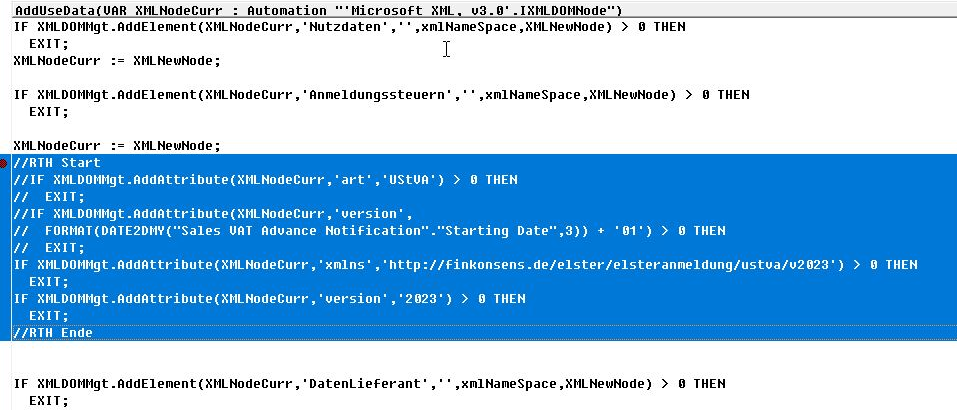
Change in the Classic Client in report 11016 to add the 2023 version for the UVA for Elster to this registration tax element: xmlns="http://finkonsens.de/elster/elsteranmeldung/ustva/v2023″ version="2023″>
Of course, you can also make this look nicer by simply deleting the commented lines completely.
You XML file will then look something like this:
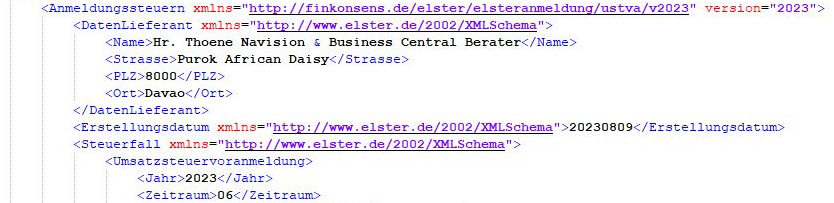
Depending on which Navision version you are using, you may need to make further adjustments to your output, but this is definitely one of the most important changes. If it does not yet work with Elster and the XML-UVA advance VAT return: Get in touch with me!
It is no longer used today, but various Navision versions still require it for UVA output with XML.
ZUGFeRD & xRechnung
The compulsion of the federal government (perhaps more precisely: the insolvent treasurer of the Federal Republic of Germany) is looking for more and more sources of income. However, since large and growing proportions of the federal population are largely passive recipients of benefits and therefore naturally fail as a source, even more has to be squeezed out of the last remaining beneficiaries in Germany. Don't be under any illusions: xRechnugen and the long-dead ZUGFeRD are officially coming under the mantle of "modernization" and "digitalization". However, they are only a thin veneer over the technical possibility of being able to monitor the flow of sales in Germany even better. These invoice formats therefore do not have their origins in any kind of business friendliness. The possibility of tax refunds in any form could simply have been abolished or restricted, and CumEx and VAT fraud models ("VAT carousel") would simply have been useless and that would have been that. But that would be too simple, and simple is simply too much for German legislation. That is why a new administrative monster is being created with enormous conversion costs, especially for small companies - entirely in the spirit of ViDA VAT control.The result will be online monitoring by the financial authorities in every EU country before the end of this decade. And across borders too. Value added tax (VAT) does not apply to third country transactions. But here too, cost and service invoices will be monitored more and more intensively, as this is of course where the last tax loopholes lie. Be that as it may: total monitoring will come; it is already common practice in the catering industry and other cash transactions, e.g. in Poland, Hungary and Austria. However, the topic is still so new and therefore so complex that I have dedicated a separate article to xRechnung and ZUGFeRD in Navision Financials Dynamics, Attain and Microsoft Business Central BC365. You can find it here.