

If you manage a machine park, are seriously involved in maintenance management or deal with devices, tools and used machines (selling, purchasing, maintaining, repairing, upgrading or simply repairing), then you are immediately involved in machine management (or device management). You then know at least these requirements for your machine file:
Life cycle management
You may be selling new machines, tools and equipment. And the life cycle of a machine or tool begins as soon as it arrives. For example, you buy an excavator, a caterpillar, a locomotive or a convection machine for your showroom. You then lend these to (potential) customers via loan delivery bills. The first maintenance or even repairs may already be required when the machines are returned. At some point, you will finally sell the machine or appliance to a customer. See also the lower part of this page with the topic „Equipment“.
But now the history really starts 🙂 When was the machine last serviced? When is the next service scheduled? What parts should your mechanic have in the car when he goes for a service? There are certainly wearing parts or operating fluids that need to be changed periodically anyway or, based on experience, should perhaps be changed too early rather than too late. If your technician has the right products in the vehicle, this will increase the value of your service visit.
Used machines
In this way, even used machines are still a worthwhile investment for your customers and a revenue generator for your company. The journey is worthwhile for your customer, the machine owner, as well as for you: a cool win-win situation. And, of course, both sides simply save nerves, time and therefore money if your service technician arrives well prepared for the maintenance appointment. Of course, this not only applies to the used machine trade, but also to the sale of new machines and the associated life cycle management.
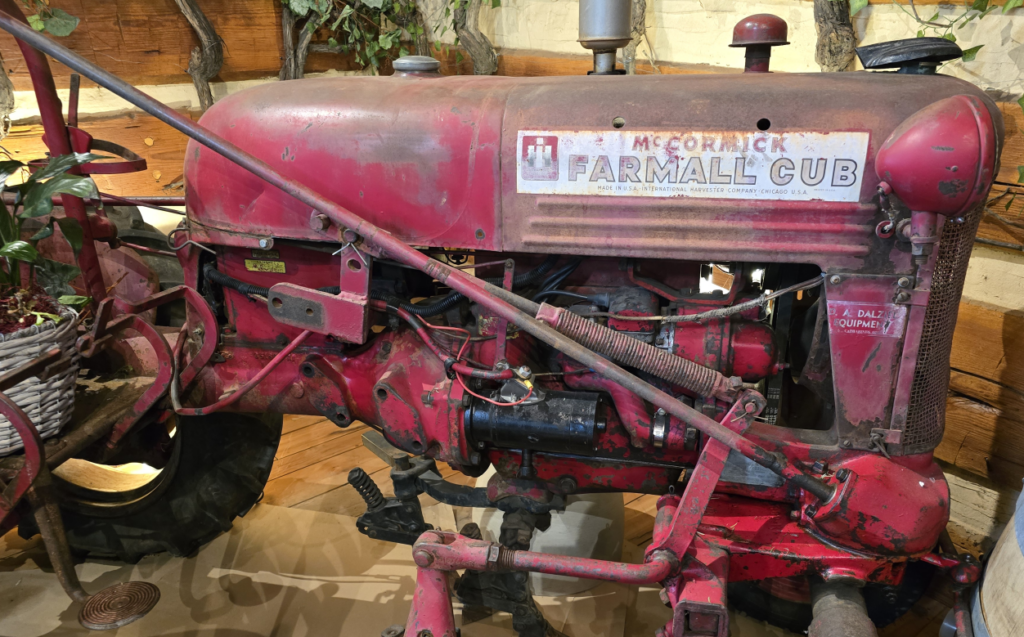
Of course, you can also use this support for your maintenance management for the machinesadministration and devicesadministration in your own tool park! And you can mix and match as you wish.
When your technician returns to the company, he can easily enter the maintenance report for the equipment maintenance or machine repair in your Navision. Or, of course, he can do this on site with his laptop.
Of course, little gimmicks such as machine stickers (often printed oil-proof with an acid printer and securely attached to the device several times!) or paper maintenance reports are still on board: not every mechanic wants to operate a cell phone or laptop with oily fingers - no matter what other salespeople promise them for these software products! And: Not every machine shop has free Wifi or 5G... We are still in Germany 🙂 But even in other countries, it may simply not be allowed to operate your own cell phones or laptops at the equipment locations. If this is the case, you can of course also record the maintenance history, installed or exchanged spare parts directly online in Navision! Everything can, nothing must 🙂
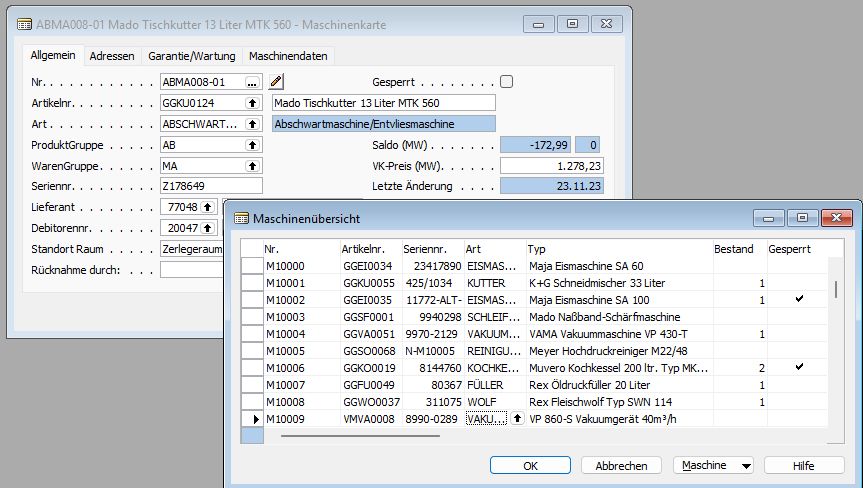
View in Navision Dynamics/Financials Classic Client of the machine management („machine file“), machine list (device list, tool list):
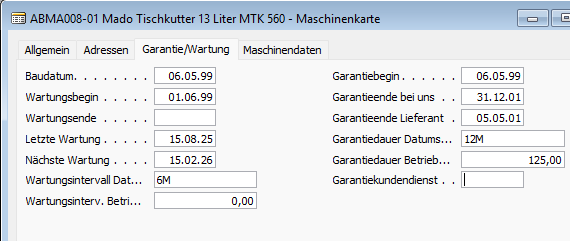
Many dates also need to be managed for effective maintenance and warranty management. The usual Navision date formulas facilitate the entries here:
Features, spare parts lists, maintenance parts, accessory lists
Clearly, a forklift truck has completely different characteristics (drive type, maximum lift, maximum weight, number of wheels) than a gas grill (operating pressure, gas consumption per hour) or a refrigerator (operating voltage, temperature range).
Properties
I've already seen some pretty horrible solutions which then senselessly and mindlessly added new fields to the article card, article table, as if there was no tomorrow.
And: No matter how much effort you put into the definition: If there is a tomorrow after all, you will still want to sell tractors and fire engines... and once again you are missing property fields such as the number of blue lights or on-board voltage (12V, 24V, 230V).
In my machine card (my name for machine management and tool management) YOU define which different machine types or tool types you have! YOU define which properties you want to manage for each device type or tool type. And that one hundred percent without any programming or design knowledge.
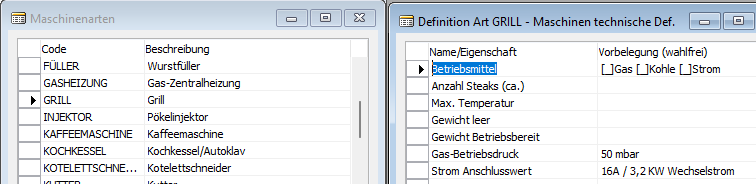
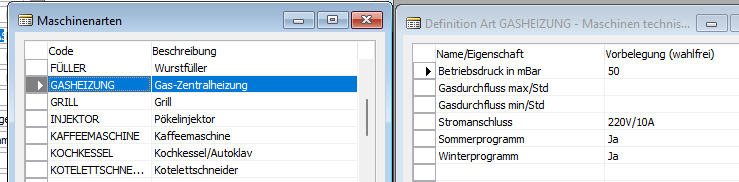
Of course, as you know from Navision or BC365 (Business Central 365), there are no restrictions on the number of machine types or the number of technical properties per machine type. This means that you can also classify a tunnel boring machine using this method of machine management!
Spare parts lists
Your machines certainly have the usual wear parts. Carbons for the engine, gaskets for the carburetor, oil for the drive. And it happens again and again that a service technician returns from a customer appointment without having achieved anything because he did not carry a common wear part in his company car (of course you can also check rental cars or company cars with my equipment management!.
Turn that off! Enter the usual wear parts for the machines used by you or maintained by you as accessories and the usual maintenance as text instructions directly in the machine management system.
Maintenance history
If desired, even disposals booked in inventory management can flow directly into the currently booked machine as a desired spare part item - or even into all devices of the same device type! Once you have replaced a hydraulic pump on an excavator, this hydraulic pump is automatically added to all excavators of the same type or type class as a possible spare part directly in the equipment management system and is therefore immediately available to any maintenance technician in the future.
Accessory lists
Do you know the calls in the spare parts management „Erich, what was the part number for the carburetor for the 8015/4711 ride-on lawnmower?“ Erich: Hang on a minute, I think it was something with VG23 at the beginning, have a look in the microfilms under „Machine attachments“! That works really well... until Erich retires at some point. Real device management should also survive the retirement of the best parts planner! This is how integrated maintenance management with Navision or Business Central 365 (BC365) works today.
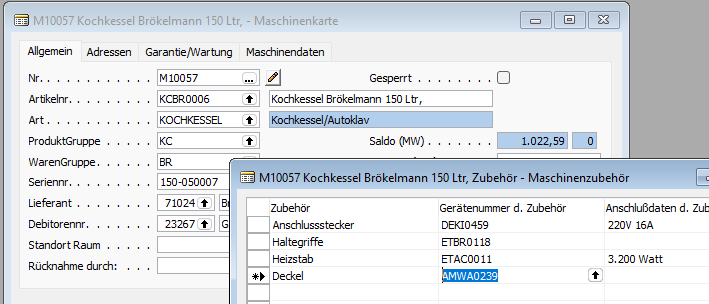
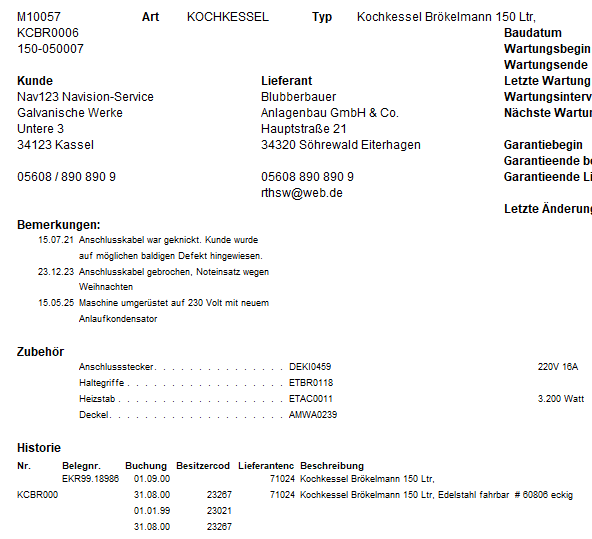
Of course, you can also print out all this information, such as repair history, maintenance instructions and spare parts lists, conveniently and compactly for a maintenance appointment - paper is still not only patient here, but enormously helpful. Or you can give your service technician a laptop that they can use to research and look up everything online. But... if you'll allow me to give you a hint: even today, it is often much more sensible and easier for your workshop manager to print out the maintenance dates for this week from the equipment management as a complete machine file with all the information on all the machines and equipment that are due for maintenance this week on paper and then hand it to the respective service technician as required - this way, nobody has to type on the laptop keyboard with oily fingers. Let your technicians do their work and hire a temporary employee to enter the service orders when they return - in most cases, this is cheaper and easier! You really want to go online? OK, then laptop or tablet, and off you go. You're the boss.
Repair history, workshop history
You can enter the respective machine number in each order, invoice, purchase order per document and also per line, including in each item posting sheet:

If you enter a machine number in an order, the current owner is automatically transferred to the customer number and delivery address of the sales order. In this way, you automatically maintain a change of owner without any additional effort if, for example, your customer Achim Müller sells a machine supplied by you to Mr. Schulze without consulting you. As soon as Mr. Schulze calls you for maintenance or repair, you simply enter the machine number in the invoice - that's it! Navision or BC365 does the rest for you, you don't have to do anything extra. And of course the machine retains all maintenance data, histories, spare parts lists...
Workshop history
If required, this maintenance management system can also maintain the spare parts installed with it directly for all machines of this type or subtype (e.g. the right hydraulic pump, the right transformer, the right control units) or directly for the specific machine. In most cases, the penultimate or last variant is the best, as a connector rarely fits automatically on all refrigerators listed in the appliance management. This is why the subdivision into types, subtypes or directly to the appropriate and unique machine.
A pro pos... How does Mr. Schulze know that YOU are the right contact for the maintenance or repair of this appliance? Do you remember the introduction at the top? Machine stickers! On request, not only with the barcode and human-readable machine number, but also with your company name and your telephone number/email address! As this sticker only carries a machine number from your device management and no other technical properties, this sticker is worthless for your competitor. Only your service technician will be able to see all the associated information on his cell phone when he scans this sticker with his Navision or Business Central 365 app. This turns your maintenance management into a real game changer in your customer loyalty, without making your competitors „too smart“.
Repair cost recording, cost price determination, sales price determination
Every purchase to a machine number, every sale to a machine number and, above all, every stock withdrawal (spare parts) to a machine number is logged in the machine/device.
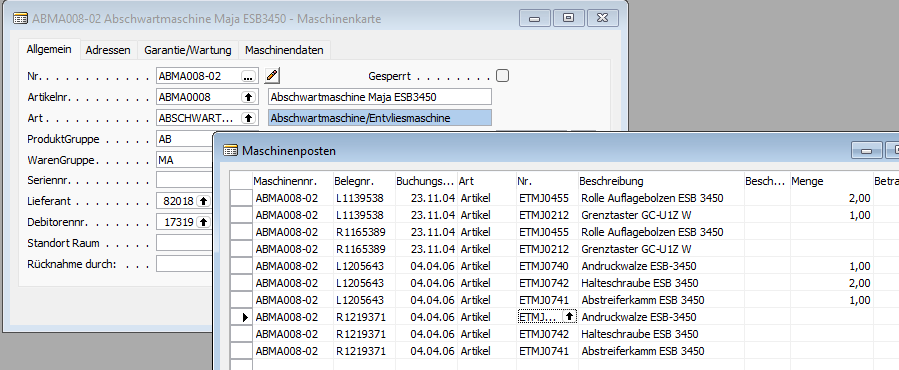
In this way, you can easily determine the (re)acquisition costs and also the repair costs for a returned machine in order to arrive at a viable cost price and thus also a solid sales price for a used machine.
Runtime recording, maintenance cost recording
You can also enter a machine counter reading with every article booking, every order, every purchase order and every invoice. For example, the kilometers from the speedometer, or the machine running time, or the operating time... in this way you can also evaluate subsequent cost/benefit analyses! In this way, your maintenance management is combined with your equipment management to create integrated machine statistics and life cycle management - without you having to invest too much working time and recording effort.
Inventory management, display in the webshop, offers
Via location management (see above), Navision „knows“ when you purchase or repurchase the machine or tool that it is in your inventory. Via my Showpar interface can then use this machine with its PIM data can be stored directly in Shopware as their own unique machine, with meter readings or repair histories, for example. In this way, you can bring your used machines directly into your store without much additional effort and offer your machines there profitably for the next enthusiast! Of course, the stock of these devices is automatically transferred with „1“ and not included in the stock of the same new devices. This turns your equipment management into a real marketing tool for your rental equipment fleet or your used equipment shop without any additional effort.
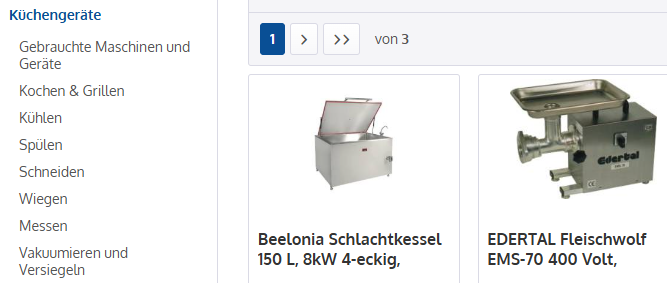
And since you can extend the properties etc. in your machine administration yourself without any restrictions, it is -from a technical IT point of view- It doesn't matter whether you manage industrial machines such as punching presses, presses, paint booths or construction dryers. Or road construction machinery such as road separators, excavators, wheel loaders and compactors. Whether you want to manage gasoline or diesel-powered or electric machines and equipment. Do you manage emergency vehicles with combustion engines or electric drives? Cranes or work platforms? For flexible equipment management, these are appropriately classified data records that divide the equipment and machines into different groups for your maintenance management, which in turn can have very individual properties and histories.
Don't forget: My Machine Management works on your Navision or Business Central 365 and can therefore be adapted to your specific requirements just as easily as any other solution in Business Central 365 or Navision Financials.
Alternative software products for machine and device management
Of course, there are also specialists for all these applications, such as ToolSense, Orsy@Online from Würth (I think this is one of the really big ones), QualityCircleEquipment (I haven't heard that much about them on the market yet, but that doesn't have to mean anything...).
Wattro and Timly are more likely to be specialists in pure in-house tool management and therefore cover an area that my machine file could also cover. But... do you really want your own isolated solution with file interfaces and different operating concepts in your company? Wasn't it precisely the standardized operation and central data storage of all company-relevant data that drove you to opt for Business Central 365 or Navision Financials from Microsoft?
Difference between asset accounting and machine management, device management
Let's start with the differences between machines and therefore machine management, devices (device management) and tools (with tool management).
Machines and machine management
Machines are generally big. And expensive. In general business, large stamping presses, locomotives, excavators, trucks, articulated lorries, large generators in power plants are usually referred to as machines.
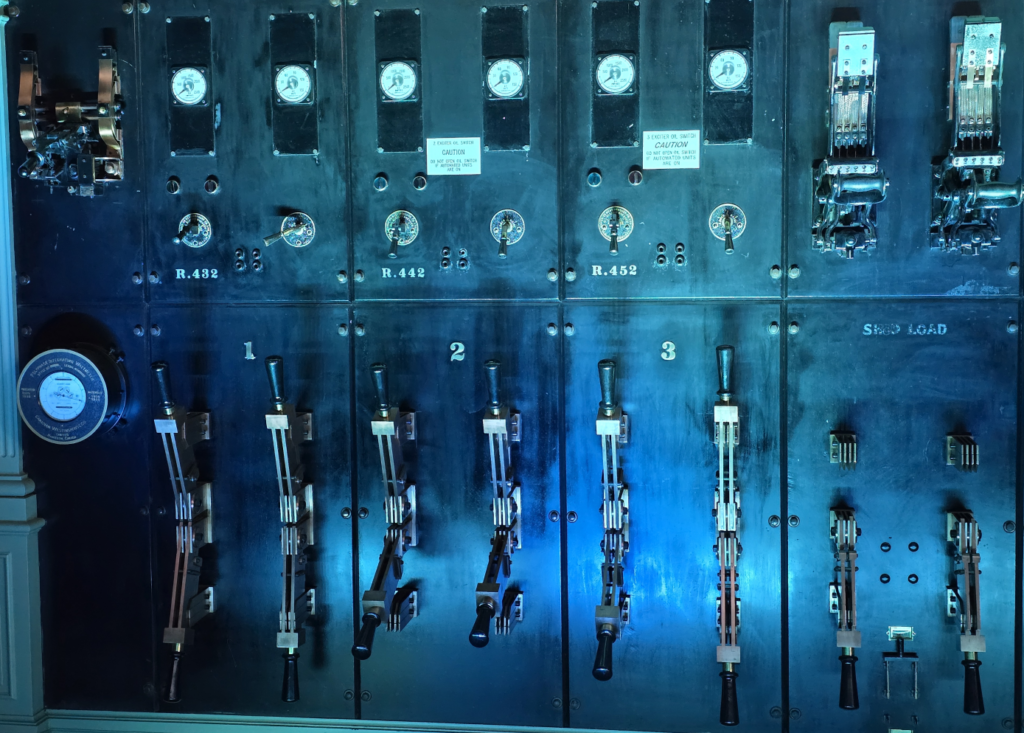
Rolling and punching machines also often deserve this designation. In addition to the high acquisition and operating costs, machines are often characterized by the fact that they are very stationary and cannot be easily transported (moved) from one location to another. Entire conveyor systems, paint shops and assembly lines, e.g. in the automotive industry, would therefore also fall into this category. Although, from an administrative point of view, they usually consist of many individual machines and devices - and each individual device within this machine group requires its own repair histories and spare parts lists in its specific maintenance management.
As there are no fixed boundaries and the designations are often fluid and overlapping, there are also sewing machines and drills. However, I would rather classify these in the following category:
Devices and device management
Appliances tend to be transportable, but are still capital goods. In the household, for example, we know washing machines, cooling appliances such as refrigerators, heating appliances, the sewing machines and drills already mentioned under machines (although drills, electric planers etc. can easily fall into the following category again). Appliances are often quite stationary things, usually with water, electricity or gas or other energy connection, which can be moved with reasonable effort, but are usually not moved. Quite in contrast to...
tools and thus the tool management
As the „machine“ part of „drilling machine“ shows, the transitions here are also fluid. Tools are often, but not necessarily electrically powered, very portable and therefore mobile. However, road and machine builders with their hydraulic tool attachments for huge excavators can probably only smile about „portable“. Hydraulic shears can be quite portable, like their pedant in the fire department, but can also weigh several tons, like the version on a Airport scrapyard And can turn entire aircraft parts into scrap metal with the flick of a lever. As an attachment to an excavator, however, it is highly mobile again.
Conclusion
The terms machines, appliances and tools cannot be clearly defined. While the first punching machines, drilling machines and sewing machines were still connected to large hydroelectric power plants or steam engines via transmission belts, and were therefore by definition „machines“ that remained stationary, they became smaller and more mobile over time and with electrification, and are now more likely to be classified as appliances (sewing machine) or tools (drilling machine). While punching machines and large generators simply changed their drive type and are often still very stationary today, together with larger lathes. However, neither for my machine file and the associated maintenance management nor for asset accounting does this subdivision into different terms make any difference. For the computer, these are all simply „data records“ with different properties. And because it is not so easy to differentiate between them, a new, overarching term has been created in financial accounting: The...
Assets and asset accounting
While my machine file doesn't care whether you call a dough mixer or bread slicer (bread machine) a tool, appliance or implement, there are much simpler (and firmer) rules for differentiation in asset accounting: The value of an asset.
My machine file can manage both its own machines & equipment (and of course tools). From a Navision perspective (or BC365 perspective), these are all just data records with a current location, a current owner (this can also be us, while the machine (e.g. a table cooler at the funfair or an excavator at the road builder's) is currently at one of our customers. And if the customer likes our bulldozer so much, then we simply sell it to him. It remains the same data record in our machine or equipment file with the same history. Even the data already recorded in the maintenance management system does not change as a result of the sale. The machine or device remains the same.
Asset accounting
The situation is different in asset accounting. Have you ever looked at asset accounting in Navision or Business Central 365 (BC365)? Definitely one of the best and coolest asset accounting systems in the world. Which, in my view, also applies to Financial accounting applies, around which the entire Navision/BC365 universe is built. Navision Financials 2.01 already supported maintenance plans and insurance in addition to normal depreciation and valuation in asset accounting. But... Asset accounting always refers to machines and equipment that are belong to us. And that's a big difference to my machine file, which doesn't care who owns the machine that they manage in the machine file. We can also buy used machines back from customers several times and resell them to other customers. Customers can sell machines and equipment or tools to each other without our knowledge, and we simply note this as a change of ownership in the machine file if we become aware of it, e.g. through a repair.
Attachments
Assets, on the other hand, belong to us, and when we sell them, we have to book residual value adjustments or total depreciation and all that kind of stuff. Many companies don't like their assets and the associated purchases, depreciation, write-ups, etc... and therefore prefer to leave this to the tax consultant. They are happy: easy money. Maybe we'll take a look at your asset accounting and you can do it yourself with Navision in the future?
And another big difference: Under tax law, machinery, equipment, tools and installations below a threshold value (Until 2018 410 euros net, since then 800 euros net) GWG (low-value assets), and therefore fully depreciable in the year of acquisition. It is somewhat more difficult with machines and equipment (and of course tools) that we rent out: These are assets for us during their time in our ownership. However, if we sell them to a customer (even if we plan to buy them back later!), we have to derecognize them from our asset accounting and book them back in as a new asset when we buy them back.
If you frequently have such business transactions, please contact me: We can link my machine file with your Navision / BC365 asset accounting system so that we can create an asset semi-automatically from a machine file. This takes the horror out of repurchasing for rental purposes.
Please note: If you purchase „any“ machines and equipment that are not intended for productive use in your business, you do not need to manage them as assets! These are then items and stocks.
This division is somewhat „gray“ in the case of demonstration appliances: Often a dishwasher or a refrigerated counter or a convection oven is purchased for the purpose of resale, but then sometimes used at a company party or in the break room itself, and then sometimes rented out as a used appliance and then ultimately sold.
Here you are in a gray area. It is common practice NOT to transfer these devices to asset accounting, but to manage them as items in the warehouse as stock, e.g. also via my machine management. Your tax advisor can help you with the classification of your specific requirements.