


Estimated reading time: 6 minutes
Background
Real Navision licenses do not expire! I have always postulated this. Developer licenses expire. And now something very, very funny has been added: The Cronus AG license also expires! But: You never see it. Only when it's too late.
Many Navision installations were carried out in this way: Setup from the DVD / DVD image on the client, connect to the server, done. This also works perfectly, as the demo license supplied has an important feature: it can connect to the server. And so Navision (Business Central 365 does not affect the problem, as there is no longer a C/Side development environment!) could access the real license stored in the database.
Activate Windows
Search engines sometimes direct you to this page at the top of the hit list when you are actually looking for a way to activate your Windows 10 or 11. For example, because you have replaced your motherboard or for other reasons. And you „actually“ had a legally licensed Windows 10 or 11 the whole time.
OK, then let's have breakfast with this, even if it is related to the actual topic, the expiration of the license file for the development environment of Navision Dynamics (this did not concern Navision Financials) or Navision Dynamics 2018 = BC365 14. But nobody likes to search unnecessarily.
So: Open Powershell (Start, then type „PowerShell“, after a few letters the Windows Power Shell appears in the selection. Click on it with the right mouse button and select „Run as administrator“.
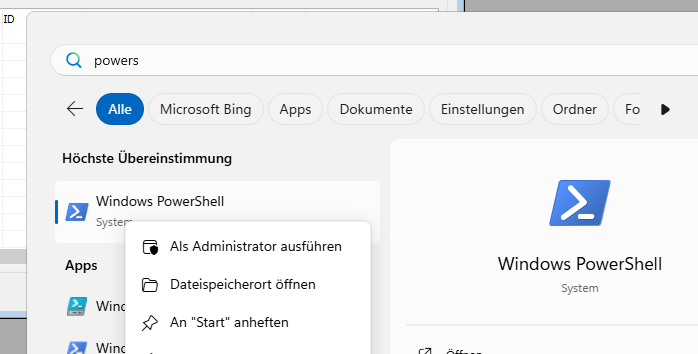
Then type in: irm https://get.activated.win | iex
After a few seconds, the menu to activate Windows 10/11 appears:
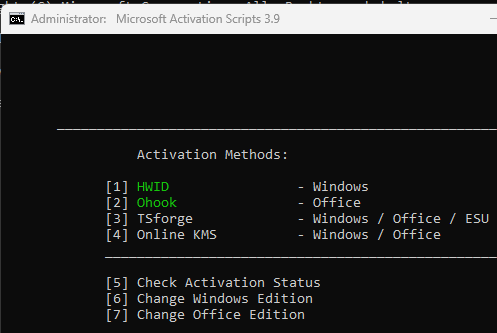
With [1] you can activate your Windows 10/11 installation.
Back to Navision Dynamics & Business Central 365 (BC365):
Which Navision versions are affected?
Important: This only affects the C/Side development environments of the RTC clients! The legacy Navision versions (2009R2, 2.01, 3.60 etc) up to 2009R2 always work with the same license, i.e. the real company license. BC 365 works with AL code, and the compiler in the background now also always works with the license from the database.
What happens? You start (perhaps for the first time since July 8, 2024 (8.7.2024, or in US format 07/08/2024)) your C/Side development environment, and receive the error message with the heading „Microsoft Dynamics NAV Development Environment“ and the content „Your program license has expired.“.
What happened?
A) You could work with a „found“ Navision license (fin.flf) from some system house. OK, then that's over now.
B) But you could also be completely honest and not use a third-party license... and still receive this message!
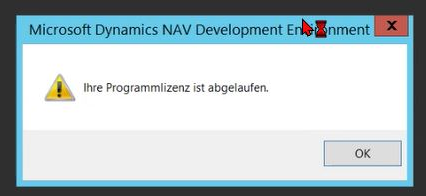
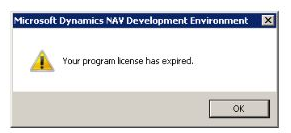
Microsoft once came up with the glorious idea of giving the demo license mentioned above, which is only supposed to connect to the server or database, an expiration date:
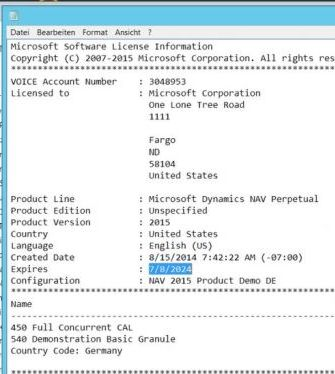
For example, July 8, 2024; there will certainly be other dates as well.
Solution for „Navision: Your program license has expired„
Please open the directory of your local Navision CSide development environment with the file explorer, recognizable by the finsql.exe contained therein:
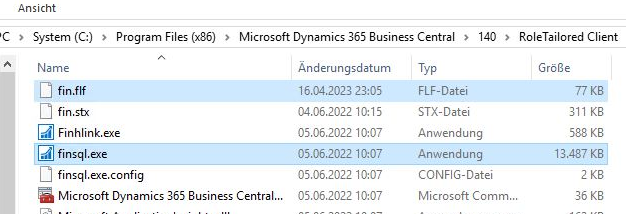
The path can be e.g:
System C:\Program Files (x86)\Microsoft Dynamics\120\RoleTailored Client
System C:\Program Files (x86)\Microsoft Dynamics 365 Business Central\140\RoleTailored Client
The part formatted in bold is fixed, the part in between varies depending on Microsoft's current mood.
You do NOT want to go to the 64-bit folder c:\Program files\...! The development environment of Navision Financials, Microsoft Dynamics, Business Central 365 14 = Navision 2018 is always a 32-bit application and is therefore located in the (x86) folder.
The fin.flf stored here is most likely a demo license as shown in the screenshot above. Maybe there is no fin.flf here, but only the demo license cronus.flf! But you can just leave it there, it won't hurt any more.
- Copy your original end customer license into this path, e.g. Schulze(47110815).flf.
- Rename the found fin.flf e.g. to fin.flf.old
- Rename your own license to fin.flf.
If you now restart your C/Side (CSide) development environments from your Navision Financials Dynamics Attain or Microsoft Business Central BC365 RTC client, the magic is over.
Other „tips“ from the Internet
By the way, on the Internet and at the right prompt also at ChatGPT there is the recommendation to pull a newer Cronus Fin.flf demo from a newer Navision version and then copy it over the expired one... what nonsense... Save yourself this „tip“ and finally solve the problem with these instructions here.